Showing posts with label Facebook Tricks. Show all posts

How to make Single Name Account on Facebook or How to Hide Last Name on Facebook.

Many people have been searching on Google about How to make Single Name account on Facebook? or How to Hide Last Name on Facebook?    Well, here is a simple method explaining about how to make single name account on facebook successfully but one thing you should make a note is Indonesians are officially allowed to have single name on facebook as most of the people on Indonesia have only one name and that’s why Facebook allows them to have the single name. Steps for how to make Single name account / Hide last name on facebook :   Step 1 : From your Mozilla Firefox browser, open your facebook account and go to " General Account Settings ".

Now Design your Facebook Profile wall in a New Attractive Way!!


So now how to create your facebook profile wall in those type of attractive way? 

Select any best picture which you want to show on your facebook wall, then Click Here.

Step1:

Now under 'Upload Image File' box, you have to select your picture and click 'UPLOAD IMAGE' button and your picture gets uploded.

Step2:

You will be redirected to 'CONVERT AND RESIZE' page, so there you have to resize your picture into 321*322 format.

Now Design your Facebook Profile Walls in a New Attractive Stylish Ways!!

Remove the tick under the 'Keep Proportions' box and keep width as 321 and height as 322 and click 'RESIZE IMAGE' and the new resized picture will be asked to save, so select any folder and save it.

Step3:

Now here comes the major part, Click here and upload your new resized picture by following the same procedure in Step1. After your uplaod finishes, you will be redirected and there you have to click 'SPLIT IMAGE' at the top and make no of Rows = 3 and no of Columns = 3 and click the button 'SPLIT IMAGE'.

Check the below image for example,


It takes a few secs to split your image into parts and when it completes, A win rar file will be getting download in your browser, when the download finishes, save that win rar file in any new folder of your pc and now extract that win rar. 
You will get 9 parts in that extracted folder with names as (1)-0-0, (1)-0-1, (1)-0-2 ......... (1)-2-1, (1)-2-2.

Now upload all those 9 images in reverse order into your facebook profile in a new album. 

Note - Upload the 9 images in Reverse order [bottom to top] which means from (1)-2-2, (1)-2-1, ...... to (1)-0-0 in a new album and tag your profile name in all those 9 uploaded images from top to bottom so that the tagged pictures will appear on your profile wall.


After you tagging completes, it will appear like the below picture,


Now Design your Facebook Profile Walls in a New Attractive Stylish Ways!!

From now make sure that you wont get tagged in any pics of your friends because if you accept any tags, those new tagged pictures will start appearing on your profile wall by replacing our old splitted pictures.

How to get stop tagged in any posts or pictures?
Click here and keep Tagging Review = Enabled.

Note - Splitting images will give good results to only some pictures like square type of resolution but not for all kind of pictures, so choose any best suitable square format pictures to get splitted. Try to choose a picture contating your face or half of the body b`coz if we choose a pic containg our full body, splitting may gets problem.

If you found any best splitted pictures on a profile wall, you can ask that particular person to tag your profile name also on his 9 splitted pictures, so that your profile will also get those same pictures on your wall.

Now Design your Facebook Profile Walls in a New Attractive Stylish Ways!!


I hope this post will help you to create your facebook profile walls in attractive ways of your choice. Please share this post with your friends and help us by spreading our content to public.

Troll your friends by updating Facebook Status via iPhone, iPad, BlackBerry, Samsung Galaxy etc from your computer.


We might have seen many people updating their Facebook Status from their Smart phones like iPhone 4S, iPhone 5, iPad, BlackBerry, Samsung Galaxy Note, Samsung Galaxy S III, Sony Xperia Arc S, Windows Phone and many other popular devices.

But everyone is not much rich enough to buy expensive smart phones like iPhone, Blackberry, Windows Phone, Sony Xperia, Galaxy etc. 
So today www.SweetFun.tk will provide you a great trick to update your facebook status via iOS, iPad, iPod Nano, 
Android, Windows etc from your Computer only.


To Update Facebook status via iPhone 4S from your Computer : : Click Here.


--------------------------------------------------------------------------
Note: Some of the below apps are not working. We will update it soon.

--------------------------------------------------------------------------
To Update Facebook status via iPhone 5 : :  Click Here 

To Update Facebook status via iPhone 5S : : Click Here

To Update Facebook status via iPhone 5C : : Click Here

To Update Facebook status via iPhone 4S : : Click Here 

To Update Facebook status via iPhone / iOS : : Click Here 

To Update Facebook status via iPhone Diamond Rose Edition : : Click Here 

To Update Facebook status via iOS 6 : : Click Here

To Update Facebook status via iOS 7 : : Click Here 

To Update Facebook status via iPad : :   Click Here 

To Update Facebook status via Apple MacBook Pro : : Click Here

---------------------------------------------------------------------------------

To Update Facebook status via Android : : Click Here 

---------------------------------------------------------------------------------

To Update Facebook status via Blackberry : : Click Here

To Update Facebook status via Blackberry Z10 : : Click Here 

To Update Facebook status via BlackBerry Porsche P'9981  : :    Click Here

---------------------------------------------------------------------------------

To Update Facebook status via Nokia Lumia 720 : : Click Here

To Update Facebook status via Nokia Lumia 928 : : Click Here

To Update Facebook status via Nokia Lumia 1020 : : Click Here

To Update Facebook status via Windows Phone : : Click Here 

---------------------------------------------------------------------------------

To Update Facebook status via HTC Evo 3D : : Click Here 

To Update Facebook status via HTC Sense : : Click Here 


---------------------------------------------------------------------------------

To Update Facebook status via Samsung Galaxy S III : :

To Update Facebook status via Samsung Galaxy S4 : : 

To Update Facebook status via Samsung Galaxy Grand : :

To Update Facebook status via Samsung Galaxy Y : : 

To Update Facebook status via Samsung Galaxy Tab 7.0+ : : Click Here 


To Update Facebook status via Samsung Galaxy Note 3 : : Click Here 


---------------------------------------------------------------------------------

To Update Facebook status via Sony Xperia P : : Click Here 

To Update Facebook status via Xperia™ Z Smartphone from Sony : : Click Here

---------------------------------------------------------------------------------

To Update Facebook status via Google Nexus 5 : : Click Here 


To Update Facebook status via Google Nexus 7  : : Click Here

---------------------------------------------------------------------------------

To Update Facebook status via Telegram : : Click Here  

To Update Facebook status via Postcard : : Click Here 

Still much latest smart phones will be updated daily. So Bookmark this page on your browser so that every day you can update your facebook status from a different smart phone.

If you have any doubts or issues regarding updating status via popular devices from your computer, you can comment below.
I hope this post will be useful to you all, please help us to grow by sharing our site with your friends.

How to Change Facebook Profile User Name After Name Limit Reached.


Has your Facebook Account Name limit is Reached or Exceeded? 
So do you want to change your Facebook Profile Name After Name Limits? 

If so, follow the simple method written below.

Mostly many people dont know that facebook keeps some limits for Pages, Profiles, Groups, Friends, Events etc. Just like we can`t change facebook profile name after 5 times, we can`t change our profile username more than 1 time, we can`t change a facebook page name after 200 Likes, we can`t change facebook group name after reaching 250 members, we can`t add more than 5000 friends to our facebook profile and  it is not possible to change the name of an event if it has more than 5,000 people invited.

Now-a-Days, Many people are keeping Facebook Profile Names in Different stylish Fonts like ȼɦǿȼLąty Þrîñçé , Nitesh Iı'e Belııve'ııŋ Mąh-self , Іі'є-єм Ѕэжҷ'Айԁ Її' Ќйѳщ'Їт , Маиѳг Кнцмая etc. But Facebook is Banning the Accounts who using those type of stylish fonts, fake names.

Also make sure that your name can`t include:

  • Titles of any kind (ex: professional, religious, etc)
  • Symbols, repeating characters or punctuation, unusual capitalization and numbers
  • Words, phrases, or nicknames in the place of a middle name
  • Offensive or suggestive content of any kind
  • Characters from multiple languages
As per facebook rules, the profile name you use should be your real name as it would be listed on your credit card, student ID, govt-issued proof etc. So I personally suggest everyone to keep your facebook account of real name without any fonts or special characters.

So if your profile name limit is exceeded and want to change your facebook profile name to your real name, then Click Here 


Fill that form and you have to upload your valid Government-issued Proof - photo ID like a Passport or Driver's license etc and after your upload finishes, finally click "Send" button.

Any 1 Proof will be enough in the list of below examples,
Examples:
  • Green card, residence permit or immigration papers
  • Birth certificate
  • Personal or vehicle insurance card
  • Marriage certificate
  • Official name change paperwork
  • Voter ID card
  • Non-driver's government ID (ex. disability, SNAP or national ID card)
Note - If you don’t have a government-issued Proof-photo ID, you can submit copies of any 2 other documents that together show your full name, birthday and picture. 


Any 2 Proofs will be needed in the list of below examples,
Examples:
  • Credit card
  • Utility bill
  • School or work ID
  • Library card
  • Check
  • Bus card
For more information about the Submission of Proofs, check the Facebook Help Center Page by Clicking Here.

Before you submit your any valid ID proof, try to have a real picture on your facebook account because this may help you to get your name change fastly as facebook staff will consider your fb profile as real profile.

My Personal Experience : Earlier I faced this problem and facebook asked me to submit any Valid proof and I submitted my College ID card picture by taking a snap from my mobile. Facebook staff verified it and changed my name within 4-5 days. So I suggest you to take a clear picture of you proof either by Scanning or by capturing from a good camera or mobile.

If you have any doubts or problems regarding with this facebook profile name change after name limits reached issue , You can ask here in comments.

Earn Money or Get Facebook/Youtube/Twitter Likes Fans by Doing Social Hits

LikesPlanet is your way to Advertise your social pages or earn Money by doing Likes! 


How to get 10,000 Facebook Followers/Fan Page/Photo Likes in a Day

Simplify your Facebook marketing with Like-ex's - Like Exchange advanced Facebook functionality. With Like-ex - Like Exchange, you can get thousands of new Facebook Follower /Fan page likes /photo likes in a day..
Like-Ex.Com

Like-Ex.Com


Free Facebook Likes

Make Successful Phishing Without Getting Catch by Web Hosting sites

Hacking web application is always curious for the script kiddies.
And hacking free web email account is every geek first attempt and it was also same for me too.
I have created my first phishing page when I was in standard 9.
After i'v created the phishing page it's got suspended within 5-6 hours. :( So it was a big challenge for me to host my phishing sites. But it was big a challenge until I’v learned some basics of php.


Here i will not describe how phishing works and how to make fake page.
I will describe how can you fool your hosting provides and host your phishing content to their server without getting suspended by them.


While Web Hosting providers attempts to find all phishing attempts from their servers, sometimes they may contact you directly to remove the phishing files.
If they receive notification, they will remove the files automatically and notify you that your website contained phishing files.

This concept is to serve a different innocent looking web page instead of your phishing page when your hosting provider try to access your uploaded content.
but when you send the link to your phishing site to victim you will send the link with a unique identification number(through URL i will come to this later).
Then only your innocent looking uploaded file turn into a phishing page.

I have tried this with 2-3 free hosting providers and every time i succeeded.
In normal scenario when you design your phishing page and upload files to your hosting account,
your Web Hosting provider attempts to find all phishing attempts from their servers, Maximum time they do this by using automated crawlers. If the crawler find any Forbidden character in your uploaded files. Sometimes they may contact you directly to remove the phishing files.
If they receive notification, they will remove the files automatically and notify you that your website contained phishing files and may suspend your account.


So how to bypass this??


Open any page you want to clone in your favorite browser.

Save the full page in .html.This step is almost common for every phishing attempt.

After saving the page you will get the page's source code and also get a folder containing all the images and client side scripts.
I am assuming, you know how to configure the action field of the form/login page to configure a phishing page.
So after changing the action field what you have to do just rename the “html” page to ".jpg"
For example if you have "Login.html". Just rename it to "Login.jpg".

Now you have to choose any web page which will be served when your web hosting providers or anyone without having that unique identification number access the page.Do the same thing with that fake page also and rename it to "fake.jpg"

Create a new file called “phishing.php” and write following content into it.

<?php
$id = $_GET["code"];
if ($id == "yourpasscode") {
$myFile = "main.jpg";
$fh = fopen($myFile, 'r');
$theData = fread($fh, 500000);
fclose($fh);
echo $theData;
}

else{
$myFile1 = "fake.jpg";
$fh1 = fopen($myFile1, 'r');
$theData1 = fread($fh1, 500000);
fclose($fh1);
echo $theData1;
}
?>

In this code you just have to do following modification..

1>Change "yourpasscode" to your desired one.
2>Change "main.jpg" to the file name which one contain the real phishing web page's code "Login.jpg"
3>Change "fake.jpg" to the file which file will contain the code of the fake page.


Now you have got the follwing files:

1)phishing.php
2)login.jpg
3)fake.jpg
4)A folder[Contains all the client side scriots and images for the real phishing page]


Now just upload all this to your hosting account.And try to access the
http://yoursite.com/phishing.php 
with your browser.

Here you will get the fake page which is not actual login page.

Now try to access
http://yoursite.com/phishing.php?code=yourpasscode
your phishing page will open.

If you want to change the GET parameter "code" just modify the second line of the php script.

Now what will happen,when your hosting privder will test your content they will get a innocent php file reading another file.and when they try will to access "login.jpg" file they will get an invalid/corrupted image.

Hack facebook Account by Mobile - Phishing


What is Phishing ?
Phishing is a way of deceiving your victim by making him login through one of your webpages which is a copy of the original one. By doing so the fake webpage will save his E-mail ID or username and password. This is used for criminal activities for stealing Credits Cards and So on.

Now we are going to make a fake login page of Facebook Mobile.

Lets start the tutorial...
Step 1: Register a new Wapka Account
First create a new wapka account from the link below.
image

Step 2: Editing Wapka Texts
Login to your Wapka account. Goto Settings>Edit text> Forum/chat and change the following words,

Name: Email or Phone 
Text: Password 
Submit: Log In 
It's shown in the screenshot below.
image
Click 'Edit' to save and Login to your account in ADMIN mode.
Step 3: Create a new forum
Create a new forum to save all hacked usernames and passwords in your site.
You can do it by Edit Site>Forum
Wapka forum
Get inside your newly created forum and note down its Forum ID. You can find it at the right bottom corner of the forum. Its shown below.
Forum ID
Step 4: Change Forum Visibility 
The forum we create above will be visible to everyone. Now we have to change its visiblity, so that admin can only view the hacked usernames and passwords.
You can do it by Edit site>Users>Items visibility
Mark 'X' to make it visible only in admin mode.
image
Step 5: Uploading Facebook Mobile Phisher Page Source Code
Just copy and paste the code below in your site.
You can add it by Edit site>WML/HTML code

Note: But before pasting, edit the code and replace 'XXXXXXX' with your Forum ID( as you found it in step 4) and remove spaces in small form tag.

Now you can see your fully designed facebook phishing page.
But there'll be only one filed instead of 'Email or Phone' and 'Password' fields.
Don't worry, wapka won't ask usernames when you are logged in.
So just logout your admin mode or open your site url in a new tab. You'll see a page like this.
image
* You can find all hacked usernames and passwords in the forum by logging in as ADMIN.
Now use your social engineering skill to make the vitim to login in your site. You can send him a message with your link.
Disclaimer: DO NOT use this for fraudulent activities use this just to gain knowledge and not to cause harm to other people in any sort.
By trying this trick, you'll surely learn the basics of Hacking, HTML and Wapka.

If you got any problem, then describe the problem in comments below...

How to Permanentely Disable Facebook’s People You May Know Feature


I’ve found Facebook’s People you may know ’Feature’ a tad annoying to say the least, suggesting people I dont want to befriend because let’s face it, if I had wanted them as friends they would already be friends right? Facebook you’re not that smart yet I’m afraid! Plus you may just get fed up staring at the same old faces!
After searching for a while on Google I found a couple of groups on Facebook (Ironic) and read a few blog articles, however it soon became obvious that most of the workarounds don’t work anymore, so I had a think and here’s my little hack to disable this feature.

Getting it blocked

Now if you’re using Google’s Chrome or Mozilla Firefox to browse the web and have Adblock installed (What you haven’t? Sort it out.) as an addon/extension you can actually use this to block the suggested friends feature!  Click Here to Install it for Google Chrome
Although Adblock was created to, you guessed it block ads! It can also be used to block certain HTML elements on a webpage via CSS selectors.
After doing a little digging around using Chrome’s built in webkit inspect we can see exactly the elements we want to target (See the screenshot below).
Facebook's Suggest a Friend HTML markup

Chrome

In the Customize AdBlock tab and under the heading section ‘Block more ads:’ you’ll want to click on ‘Hide a section of a webpage’ , it’ll prompt you for two things 1. ‘Domain of page to apply on’  and 2. ‘CSS to match’
1. For the domain
www.facebook.com
2. For the CSS
div[class="ego_section"]
Then click ‘Block it!’ and you should be all done.
Test on Chrome version 16.0.899.0 dev and AdBlock version 2.4.28

Firefox

The Firefox addon is slightly different to the Chrome version so here are the instructions:
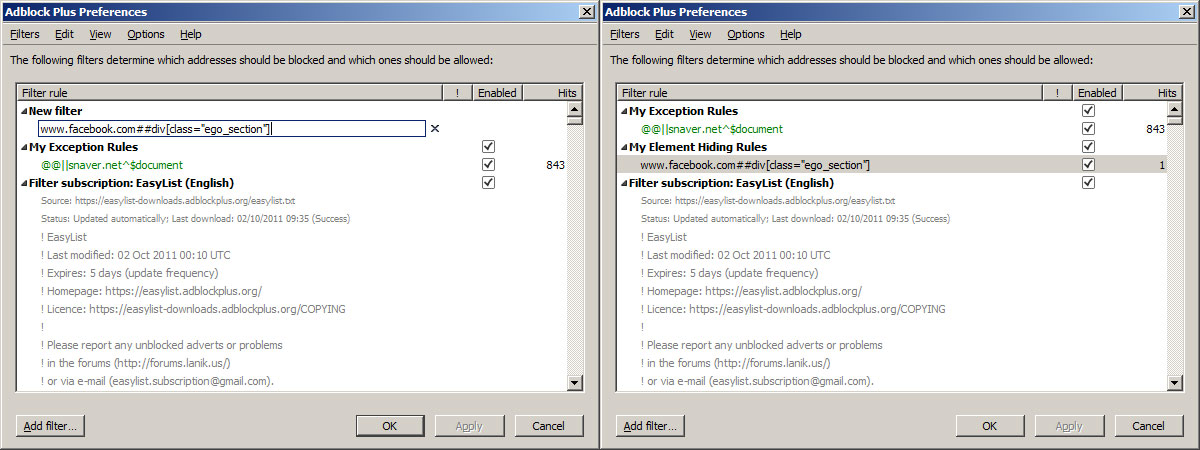
  1. Open up the Adblock Plus Preferences window
  2. Click on the ‘Add Filter …’ button at the bottom
  3. If the filter was successfully added then a new section should appear in your filter list called ‘My Element Hiding Rules’ (If this doesn’t already exists that is)
  4. Click on the OK button.
Facebook Suggest Friends Block Firefox AdBlock
Tested on Firefox version 7.01 and AdBlock Plus 1.3.10

Notes (Caveats)

There are a few caveats with this workaround at the moment however:
  1. Facebook may at any time and at their discretion change or alter the HTML elements Class/ID, completing breaking our rule!
  2. You’ll loose Facebook Events on the right hand side on your profile page (These are still accessable here https://www.facebook.com/events/ )
  3. Some other features I’ve yet to notice that have broken

New 3D facebook Emotions codes - Pictures in facebook Chat


Our Blog has pages of brand new Facebook smileys you can use to liven up your FB chat and messages right now. These smileys won’t work on your timeline, or status updates, but they work beautifully on your chat and personal messages. Your friends will love the colorful, emotions you add to your messages and conversations with these smileys.

Using our smileys could not be easier. Have a scroll through all the amazing smileys, choose the one you want, then simply copy the code in underneath your smiley and paste the code into your message or chat box and click on Enter. You’re done! That’s it, as simple as that. Your smiley will now be in your message.

Enjoy browsing the site and looking at all the different Facebook Smileys we have created for you. There are so many fantastic smileys to choose form, we’re sure you’ll be copying and pasting all the time! As long as you carefully paste all the code into you chat box or message, your smiley will appear. If you miss out some of the code, it won’t work, but don’t worry, just try again.

Don’t forget to tell your friends by linking and sharing our page on Facebook. As soon as they see you using them, they will want to try them too!

Philosopher Smiley Thinking
Thinking
Copy the emoticon code to facebook chat:

Facebook Smiley Having An Idea
Idea
Copy the emoticon code to facebook chat:

Shopping Smiley
Shopping smiley
Copy the emoticon code to facebook chat:

Stressed Emoticon Facebook Chat Code
Stressed
Copy the emoticon code to facebook chat:

Bubble Gum Smiley
Blowing a bubblegum
Copy the emoticon code to facebook chat:

Mummy
Mummy smiley
Copy the emoticon code to facebook chat:

Mad emoticon smiley for facebook
Mad smiley
Copy the emoticon code to facebook chat:

Call me smiley face
Call me
Copy the emoticon code to facebook chat:

Wink Emoticon - Winking Smiley Face
Winking OK
Copy the emoticon code to facebook chat:

Thumbs up emoticon for facebook
Thumbs up smiley
Copy the emoticon code to facebook chat:

Thumbs down emoticon
Thumbs down smiley
Copy the emoticon code to facebook chat:

Party Emoticon With Sunglasses
Party smiley
Copy the emoticon code to facebook chat:

Amazed Smiley Face
Amazed
Copy the emoticon code to facebook chat:

Nose picking emoticon
Picking his nose
Copy the emoticon code to facebook chat:

Facebook emoticon with a butt tattoo
Tattooed
Copy the emoticon code to facebook chat:

ROFL smiley - facebook chat emoticon code
ROFL smiley
Copy the emoticon code to facebook chat:

Flashing naked emoticon
Flasher
Copy the emoticon code to facebook chat:

Emoticon Watching With Binoculars
Watching You
Copy the emoticon code to facebook chat:

Pirate Smiley
Pirate
Copy the emoticon code to facebook chat:

Rocker Emoticon
Rocker
Copy the emoticon code to facebook chat:

Gangster Smiley Emoticon
Gangster
Copy the emoticon code to facebook chat:

Nurse Smiley
Nurse
Copy the emoticon code to facebook chat:

Doctor Smiley
Dr. Smiley
Copy the emoticon code to facebook chat:

Police Smiley
Police officer
Copy the emoticon code to facebook chat:

Nerd Smiley Emoticon
Nerd smiley
Copy the emoticon code to facebook chat:

Frankenstein Smiley
Frankenstein
Copy the emoticon code to facebook chat:

Witch - Halloween Smiley
Witch smiley
Copy the emoticon code to facebook chat:
Page 1 | Page 2 | Page 3 | Page 4 | Page 5 | Page 6 | Page7

 →

Total Pageviews

Powered by Blogger.
Flag Counter
 
PrinceofWah
Blogger Designed by sWeet sUNny (Muhammad Arif) Join Us on Facebook Page www.princeofwah.blogspot.com | Join Us on Facebook Group I Love Pakistan